AI setup and support for Dallas-Fort Worth offices
Your office, done by noon.
Your team spends hours a day typing emails, chasing follow-ups and re-keying data. We come to your office, put AI to work for every person, teach them to use it, and stay on call after. The goal: every person gets back an hour a day.
- Set up in person, at your office, in about two weeks
- One flat monthly price. Software and mics included.
- Not paying off in 30 days? You get your setup fee back.
Tell us about your week. We'll show you how much of it AI can take off your plate. Free, and yours to keep even if you don't hire us.
Half
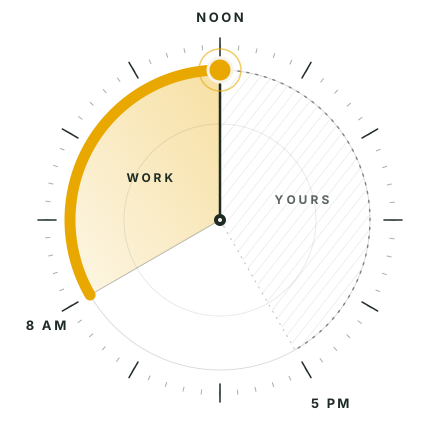
Our bet: if you're at a computer all day, we can cut that workday in half or more
12:00
when the first office manager we set up now wraps up most days
30 days
to decide if it's paying off, or your setup fee comes back
Built for any back office of 5 to 50 people
- Insurance
- Trades and home services
- Accounting
- Property management
- Any desk-heavy team
The problem
Your best people spend the morning on work a machine could do.
AI can now do most of it. Maybe someone on your team already pays for a chatbot. But a login isn't a setup. Nobody has the time to pick the tools, hook them up to your email and software, and teach everyone. So nothing changes, and you keep paying for those hours.
What busywork costs a 5-person office
Pays for itself three times over, at just one hour a day.
What changes
Same team. Same software. A lot less typing.
The big shift is simple: your team talks to AI instead of typing. People speak about three times faster than they type, so every person gets a good mic and learns to talk through their work. Then we wire the AI into the tools you already use, so it can do the follow-through.
Typing every reply by hand, all day.
Talk it through in ten seconds. The reply is written, in your voice, ready to send.
Follow-ups
Sticky notes, flags, and things that slip.
Every call ends with notes, a to-do list and the follow-up email already drafted.
Data entry
Copying from emails and PDFs into your system.
Emails, forms and PDFs land in your system on their own. Your team just checks the work.
Scheduling
Ten emails to find one meeting time.
Booked in one message. Reminders go out on their own.
Reports
Friday afternoon lost to pulling numbers.
Your weekly numbers are waiting Monday morning, in plain English.
The owner's morning
Digging through the inbox to find what's on fire.
A short brief with your coffee: what needs you today, and what can wait.
Every office is different. The deep dive tells us what to build first for yours.
How it works
Four steps. We do the heavy lifting.
-
Day 1
Deep dive
We sit with you for a couple of hours and map what your team does every day, week and month, and where the hours go. You get a ranked list of what to fix first.
-
Week 1
Setup
At your office, every person gets an AI assistant, voice dictation and a mic, connected to your email, calendar, files and the software you already use.
-
Week 1 to 2
Training
One-on-one, at each person's desk, on their real work. They learn to talk instead of type and to hand off the busywork. No slide decks.
-
Week 2 on
Automations
We build automations for your biggest time sinks from the deep dive. Then we stay on call as your AI guy.
What we need from you
- About 2 hours of your time for the deep dive
- About 1 hour per person for training
- Someone who can grant access to your email and software
What you get
One price, everything in.
- AI software for every person, paid by us
- A mic for every person (desk or wireless)
- In-person setup, one-on-one training, and your first automations
- Up to 5 hours of help a month (10 hours for teams of 6 or more)
- Replies within 1 business day
- New hires set up and trained as you grow
No add-ons and no surprise bills. Bigger automation projects are quoted up front, before any work starts.
Setup, one time
$1,650 for the first person
plus $400 for each added person
Monthly
$245 for the first person
plus $150 for each added person
All in. Cancel the monthly plan anytime with 30 days' notice. Your accounts stay yours.
Why us
You have three ways to do this.
| Do it yourself | A typical IT company | Done by Noon | |
|---|---|---|---|
| Who sets it up | Whoever has a spare evening | A tech, often remote | Us, in person, at your office |
| Built around your actual day | No | Usually one standard package | Yes. Starts with a deep dive |
| Training | Videos, if anyone watches them | A group session | One-on-one, on real work |
| Voice and mics | No | Rarely | Every person |
| Software cost | Separate bills per tool | Licenses plus hourly | Included in one price |
| Help after | Search online | A ticket queue | Your AI guy, 1-business-day replies |
| If it doesn't work | You ate the time | You still pay | Setup fee back in 30 days |
The guarantee
One month. Money back.
Give it 30 days. If you don't feel it's paying off, tell us and we refund your full setup fee.
- Your call, not ours. No forms and no hoops.
- We cancel the monthly plan the same day.
- We take the risk because we know what this does for an office.
Your data
Your accounts. Your call.
- Every account is opened in your company's name. You own it.
- Business-grade AI plans, not consumer apps.
- You choose what AI can see. The more it sees, the more time it saves.
- Leave anytime. Your accounts and data go with you.
Who you'll work with
Hi, I'm Nathan.
I run my own work on this setup every day. I talk instead of type, and a stack of automations handles the follow-through. The first office manager I set up went from working into the evening to wrapping up by noon.
AI changes every week. Keeping up with it is a full-time job. That's my job, so it doesn't have to be yours.
I love small businesses, and I love AI. I work across Dallas-Fort Worth, I come to your office, and you get my direct line, not a help desk. I keep the client list small on purpose so every office gets real attention.
Nathan
FAQ
Fair questions.
How long until we see a difference?
Right away. Most people feel it the first day they talk instead of type. By the end of the first month, it's hard to imagine working the old way.
Is this going to replace my staff?
No. We love jobs, and we love small businesses. This makes your people more capable and more productive, with time for the work that actually matters.
We already pay for an AI tool. Do we start over?
Not always. We look at what you have on the deep dive and keep what's working.
Is it safe for client data?
Every account is in your company's name, on business-grade plans. You decide what gets connected. We'll be straight with you: the more AI can see, the more time it saves, and we'll help you weigh that. If you're in insurance, accounting or another regulated field, we go over it together before anything is connected.
Do we need new computers?
No. We work with the Macs and PCs you have.
What if someone on my team won't use it?
That's what one-on-one training and on-call help are for. We sit with them until it clicks.
What does the monthly plan cover?
All the software for every person, up to 5 hours of help a month (10 for teams of 6 or more), small fixes and tweaks, and setting up new hires.
What if we want to stop?
Cancel the monthly plan with 30 days' notice. Your accounts and data stay with you.
Where do you work?
In person across Dallas-Fort Worth.
Get your afternoons back.
We love small businesses, and we know AI. Give us 30 minutes to hear about your week. On the call:
- We walk through a normal week in your office
- We show you where the hours go, and how much of it AI can take off your plate
- You get a straight answer on whether we can help. No pitch deck.
or email hello@donebynoon.ai